
Can I see my MLS® listings during the free trial?
What you can check during the 30-day trial, when your listings go live on your website, and everything else you can try first.
Short answer
Yes, in your admin. During the free trial, enter your CREA agent ID and the admin shows how many of your listings it found in the MLS® feed (“We found … of your listings in the MLS® feed”). The listings appear on your website once you move to the MLS plan, and then stay up to date on their own; checking is free and changes nothing on your website.
At a glance
- The free trial: 30 days on yourname.realtyterminus.net, no card needed. Need more time? Ask us and we can extend it. Nothing is charged automatically.
- MLS® check: Canadian REALTORS® on the free trial (or on Basic) can enter their CREA agent ID under Website, then Branding, MLS® listings, and see how many of their listings are in the MLS® feed.
- MLS® listings on the website: once the account is on the MLS plan, for REALTORS® whose brokerage participates in CREA DDF® (every province except Quebec and Manitoba).
- Also during the trial: every template, Premium ones included (add Premium when you go live, or switch to a standard template), up to 5 active listings you add yourself, your pages and blog, Live edit, festival greetings, SEO basics, the Leads inbox and Help & support.
- AI: Ask AI and Website AI are free for 30 days on every new website; after that they’re an optional add-on.
- Your own domain needs a paid plan (Basic or MLS). Upgrading keeps everything you made.
- Fees: Our do-it-yourself plans have no MLS® setup fee and no MLS® integration fee today, if your office participates in the CREA DDF® feed. If CREA ever starts charging for the DDF® feed, we would pass that charge on, with notice in advance and the option to opt out.
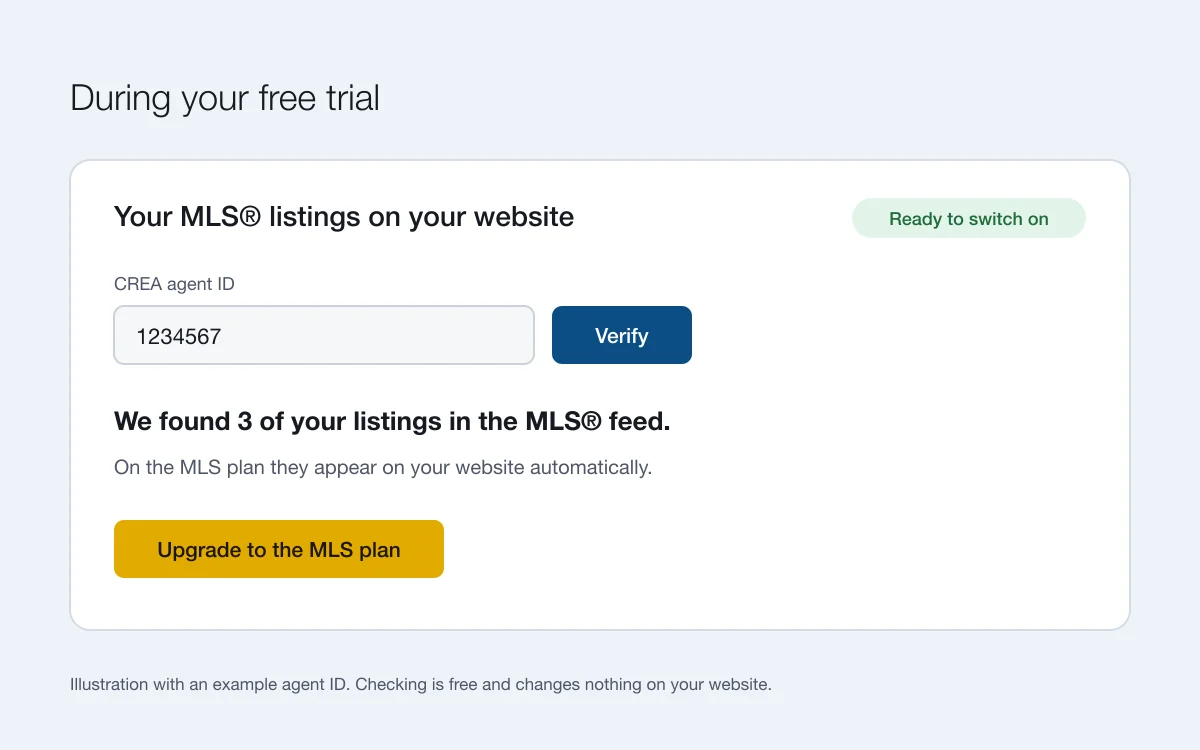
Check your MLS® listings during the trial
- Find your CREA agent ID. Open your profile on REALTOR.ca: the number in the web address, right after /agent/, is your CREA agent ID. How to find it.
- Enter it in your admin. Go to Website, then Branding. Under “Your MLS® listings on your website”, enter the ID and click Verify.
- See what we found. When your ID is in the feed, the admin tells you how many of your listings it found, for example “We found 3 of your listings in the MLS® feed.”
Checking is free and changes nothing on your website. The listings appear on your website once you move to the MLS plan, and from then on they stay up to date on their own. MLS® listings are for REALTORS® whose brokerage participates in CREA DDF®, in every province except Quebec and Manitoba.
Everything else you can do in the 30 days
- Pick any template. Premium templates and the Seasonal look are free to use during the trial. Add Premium when you go live, or switch to a standard template. See the templates.
- Set up your content. Your bio, photos, pages, blog posts, testimonials and up to 5 active listings you add yourself.
- Change it in place. Live edit lets you click the words and photos on your website and change them.
- Collect enquiries. Every enquiry lands in your Leads inbox and your email.
- Try the two AI experts. Ask AI and Website AI are free for 30 days on every new website. After that they’re an optional add-on.
- Get help. Help & support from real people, on every plan including the free trial.
Your website lives on a free yourname.realtyterminus.net address during the trial. Your own domain needs a paid plan. There’s no card to enter and nothing is charged automatically. Need more time? Ask us and we can extend your trial.
When you’re ready
Choose the MLS plan in Account, then Billing. Everything you made stays, and your MLS® listings appear once your CREA agent ID is verified. See pricing for today’s prices. Our do-it-yourself plans have no MLS® setup fee and no MLS® integration fee today, if your office participates in the CREA DDF® feed. If CREA ever starts charging for the DDF® feed, we would pass that charge on, with notice in advance and the option to opt out.
Questions
Do I need a credit card for the free trial?
No. The free trial runs for 30 days on yourname.realtyterminus.net with no card. Nothing is charged automatically: you choose a plan when you want to keep your website online.
Will my MLS® listings show on my trial website?
Not yet. On the free trial the admin shows how many of your listings it found in the MLS® feed. They appear on your website once you move to the MLS plan.
What happens when I move to the MLS plan?
Your website, pages and content stay as they are. Your MLS® listings appear on their own once you’re on the MLS plan with a verified CREA agent ID; if you verified it during the trial, there is nothing more to enter.
What if my agent ID isn’t found?
Check the number on your REALTOR.ca profile: it’s in the web address, right after /agent/. If it still isn’t found, send a request from Help & support in your admin with the topic Listings & MLS®.
Can I try Premium templates during the trial?
Yes. During the free trial every Premium template and the Seasonal look are free to use. When you go live on a paid plan, add Premium to keep them, or switch to a standard template.
Are there setup or MLS® fees?
Our do-it-yourself plans have no MLS® setup fee and no MLS® integration fee today, if your office participates in the CREA DDF® feed. If CREA ever starts charging for the DDF® feed, we would pass that charge on, with notice in advance and the option to opt out.