
Renters
Search your rentals, see the monthly rent, the move-in date, what the rent includes and the pet rules, and book a viewing.
RealtyTerminus property manager websites are made for rentals: renters find a home and book a viewing, owners ask you about managing their property, and residents send repair requests and open your Pay rent portal. You run it yourself from one simple admin.
30 days free, no credit card. Then the Basic plan on your own domain.
 Open the Robin demo (new tab)
Search your rentals, see the monthly rent, the move-in date, what the rent includes and the pet rules, and book a viewing.
Read what you do for owners and send you an enquiry about managing their property. Your fees stay “Ask us”.
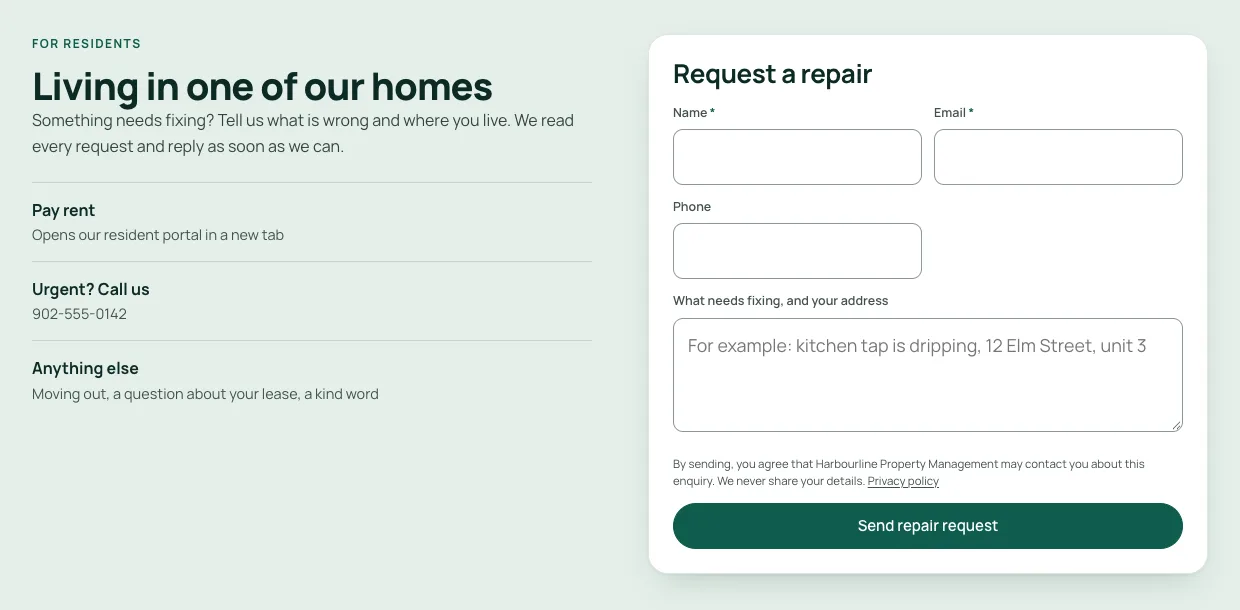
Send a repair request from the website, and open your Pay rent portal in one tap.
New property manager websites start on Robin, a Standard template included on every plan. The home page opens on a finder with two tabs, “I’m looking to rent” and “I own a rental”, then cards for renters, owners and residents, rentals shown with their monthly rent, a “for property owners” band and a residents block with a repair request form and your Pay rent button.
Lark adds what a company with several buildings needs. Renters search on a map with the rent on every pin, open a building to see a table of every home in it and what is free today, and apply online from their phone. You turn applications on per building; each application, with the renter’s photo ID and proof of income, arrives in Leads as one record. Documents are private and deleted automatically after 90 days. We never ask for a SIN.

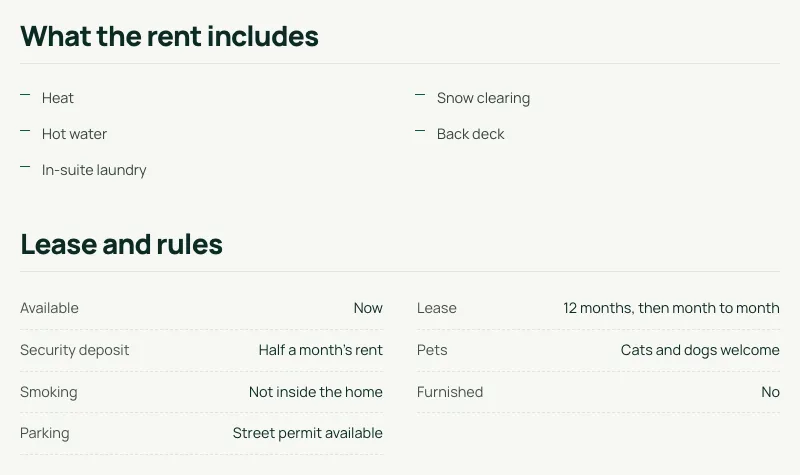
Mark a listing For lease and the listing editor shows a Rental section. Fill in what applies and the listing page shows “What the rent includes” and “Lease and rules”. Anything you leave empty is simply not shown. Rental cards show the rent as “a month” with short tags like “Heat included” or “Cats and dogs”.
Residents send a repair request from your website and owners send an enquiry from your owner page. Both land in Leads in your admin, named “Repair request” and “Owner enquiry”, with an email to you. The Pay rent button opens the portal or payment page you already use, in a new tab. We only link to it: we never collect rent and take no cut.
Viewing requests, repair requests and owner enquiries, each with an email to you. Reply from your admin and see when someone opens a link you sent.
Start on a free yourcompany.realtyterminus.net address, then connect your own domain with free SSL on Basic.
Click the words and photos on your website and change them in place. Publish when you’re ready.
Your Google title and description with a live preview, Google and Bing verification, and Google Analytics 4.
A paid add-on. In rental mode it finds rentals, takes repair requests, points residents to your Pay rent link and passes owners to you.
Real people, from inside your admin, on every plan. A reply within 5 business days.
Try Premium templates free during your trial; add Premium when you go live.
Property managers can use any template. Robin is made for rentals; the Premium templates were designed for agents, so some of their home page sections are written for buying and selling homes. You can hide or reword those sections, or preview a template with your own rentals before you decide.
 Open the Concierge live demo (new tab)
 Open the Swan live demo (new tab)
 Open the Leopard Noir live demo (new tab)
 Open the Pluto live demo (new tab)
You add the homes you manage. Property manager websites never show the MLS® feed, and there is no IDX or board agreement to sign.
No REALTOR®, brokerage or licence wording. The menu reads Rentals, Owners, Residents and Questions, and the setup emails talk about rentals.
Start free for 30 days, then Basic on your own domain. The MLS and Builder plans are not offered to property managers.
Selling homes instead? See websites for realtors or websites for builders & developers.
At sign-up, pick Property manager and enter your company name. No licence number or brokerage needed.
Add each home as a For lease listing with photos and its rental details. Your website goes live on Robin straight away.
Paste your resident portal’s address under Pay rent link, fill in your owner and resident pages, and connect your domain on Basic.
Step by step: Set up your property management website
CAD for Canadian websites, USD elsewhere, at the same number. Taxes extra. All plans and add-ons
Try Basic free for 30 days on a realtyterminus.net address. No card needed.
No credit card needed
A professional website for your rental homes on your own domain, with your own listings.
Billed yearly at $65 + applicable taxes
Create your account as a property manager, then pick Free or Basic on the next step.
Property management companies, rental businesses and landlords who rent out homes and want a website for their rentals, their owners and their residents. Choose “Property manager” when you sign up and enter your company name. No licence number or brokerage is needed.
No. RealtyTerminus never collects or handles rent and takes no cut. The “Pay rent” button on your website opens the resident portal or payment page you already use, in a new tab. You paste its address once, in Website, then Branding, under Pay rent link.
Free (30 days on yourcompany.realtyterminus.net, no card needed) and Basic (your own domain, no time limit). The MLS plan is only for REALTORS® and the Builder plan only for builder and developer accounts.
No. Property manager websites show your own rentals, which you add yourself. The MLS® listings feed comes from CREA’s DDF® and is only for REALTORS® whose brokerage takes part in it.
For each rental: the move-in date, what the rent includes (heat, hot water, electricity, water, internet, parking, laundry and more), pets, furnished or not, the lease, the security deposit, parking and smoking. Anything you leave empty is simply not shown. These fields are in every account’s listing editor when a listing is For lease.
To Leads in your admin, with an email to you for each one. Leads names them “Repair request” and “Owner enquiry”, so you can tell them apart from renters asking about a home.
An owner page with an enquiry form, where an owner tells you about their property and asks about your services and fees. Your website says “Ask us about our fees”: it never shows a price for your services unless you write one.
Yes, as part of the AI add-on, which is a paid add-on. On a property manager’s website the chat speaks about rentals: it finds rentals from your own listings, sends repair requests to a repair form, answers “how do I pay rent” with your Pay rent link, and turns owners’ questions into an owner enquiry.
No. New property manager websites start on Robin, which is made for rentals, and you can switch to any other template, Premium ones included (free to try during your trial, then the Premium add-on on Basic). Some other templates have home page sections written for buying and selling, so Robin is the closest fit.
Yes. Send a request from Help & support in your admin and we will switch it to a property manager account. Your pages, listings and photos stay.
Yes, as a separate done-for-you service, quoted per project. Tell us what you need on the contact page and we’ll reply by email.
Start free for 30 days — no credit card. Your property management website goes live on Robin today, on your own sub-domain.