
Can I get a realtor website with my own MLS® listings (CREA DDF®)?
How it works with us, which provinces are covered, what it costs, and how CREA DDF® differs from IDX.
Short answer
Yes. On the RealtyTerminus MLS plan, your own MLS® listings and their photos come to your website through CREA DDF® and stay up to date on their own, once we verify your CREA agent ID. It’s for REALTORS® whose brokerage participates in CREA DDF®, in every province except Quebec and Manitoba, so Alberta, British Columbia and Ontario are covered. There is no MLS® setup fee and no MLS® integration fee today, if your office participates in the CREA DDF® feed.
At a glance
- Plan: the MLS plan, which is everything in Basic plus MLS® listings via CREA DDF®. For Canadian REALTORS® only. Prices: https://www.realtyterminus.com/pricing
- Coverage: every province except Quebec and Manitoba, through CREA DDF®. Your brokerage must participate in DDF®.
- How it starts: enter your CREA agent ID (the number on your REALTOR.ca profile) in the admin under Website, then Branding, MLS® listings, and click Verify. If the ID is found and matches you, it’s verified straight away; if it needs a check, we confirm it within 5 business days.
- What visitors see: your own MLS® listings with their photos, kept up to date, and a Map search page where they search MLS® listings.
- Sold listings: mark a listing as sold and it stays on your website with a Sold label. The sale price is never shown.
- MLS® listings never count toward your listing limit.
- Fees: Our do-it-yourself plans have no MLS® setup fee and no MLS® integration fee today, if your office participates in the CREA DDF® feed. If CREA ever starts charging for the DDF® feed, we would pass that charge on, with notice in advance and the option to opt out.
- Free trial: During the free trial you can enter your CREA agent ID and the admin shows how many of your listings it found in the MLS® feed. Checking is free and changes nothing on your website; the listings appear on your website once you’re on the MLS plan.
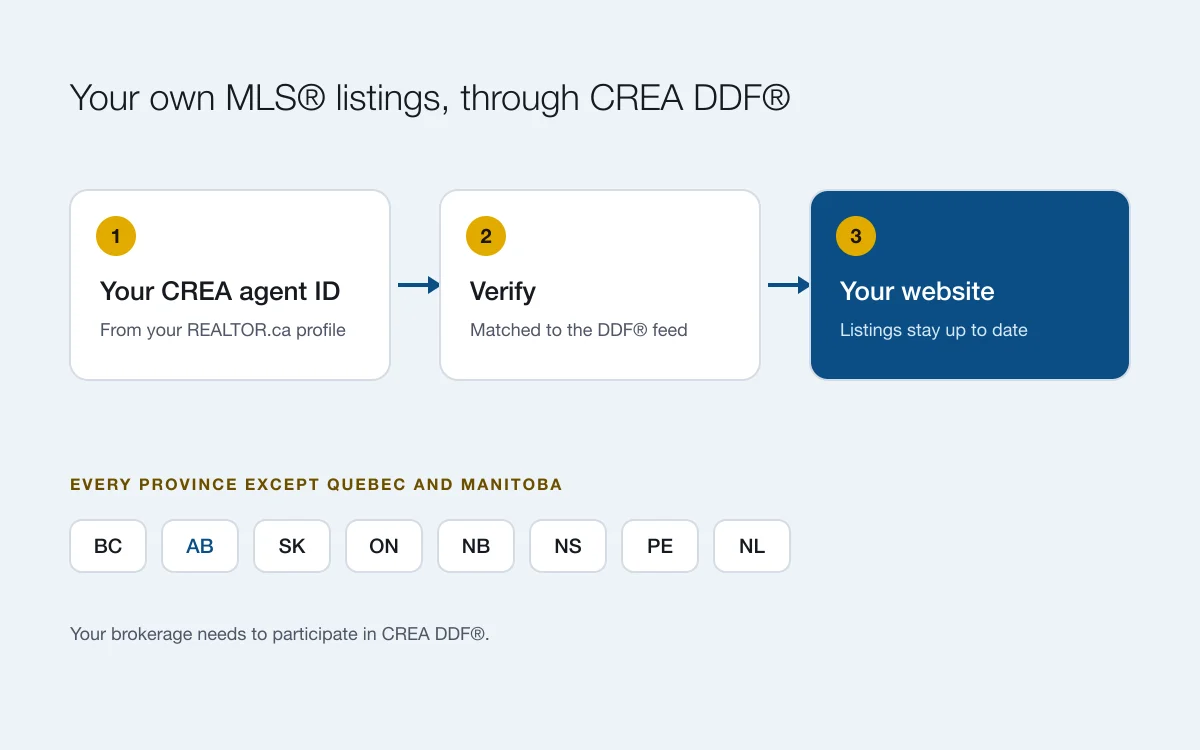
How it works
- Start free, then choose the MLS plan. The MLS plan is everything in Basic plus your MLS® listings. You can check your listings during the free trial first (see below).
- Enter your CREA agent ID. It’s the number on your REALTOR.ca profile, right after /agent/ in the web address. In your admin, go to Website, then Branding, and enter it under MLS® listings. Click Verify.
- Your listings arrive. If the ID is found and matches you, it’s verified straight away and your listings and photos start arriving. If it needs a check, we confirm it within 5 business days.
- They stay up to date. When a listing changes on MLS®, your website follows. When one leaves MLS®, your admin asks you to mark it Sold, Off market or Expired. Sold listings keep a Sold label and never show the price.
Your website also gets a Map search page, where visitors search MLS® listings by location, type, price, beds and baths. MLS® listings never count toward your listing limit, and you can still add your own listings (exclusives, past sales) by hand.
Which provinces are covered?
MLS® listings come through CREA DDF®, CREA’s national feed. We offer them in every province except Quebec and Manitoba, and that includes Alberta, British Columbia and Ontario. The condition is your brokerage: it has to participate in CREA DDF®. If you’re not sure whether it does, ask your managing broker.
Want to see Alberta listings on a real website? Our Wren demo is set up for an invented Calgary agent and shows Alberta MLS® listings.
What does it cost?
The MLS plan has one yearly or monthly price, with MLS® listings included. See pricing for today’s prices in CAD. Our do-it-yourself plans have no MLS® setup fee and no MLS® integration fee today, if your office participates in the CREA DDF® feed. If CREA ever starts charging for the DDF® feed, we would pass that charge on, with notice in advance and the option to opt out.
Is it CREA DDF® or IDX?
It’s CREA DDF®. To show your own listings you don’t need a separate IDX agreement with your board. IDX is a local board programme, usually for showing other brokerages’ listings in a search. Our guide CREA DDF® vs IDX explains the difference in plain words.
If your brokerage isn’t in DDF®
You can still have a professional website on your own domain with listings you add yourself, on the Basic plan. If your brokerage opts in later, move to the MLS plan and your listings arrive on their own.
Questions
Do you cover Alberta listings?
Yes. MLS® listings come through CREA DDF®, which we offer in every province except Quebec and Manitoba, Alberta included, as long as your brokerage participates in DDF®. Our Wren demo website, for an invented Calgary agent, shows Alberta MLS® listings: https://wren.realtyterminus.net
Are there setup or MLS® integration fees?
Our do-it-yourself plans have no MLS® setup fee and no MLS® integration fee today, if your office participates in the CREA DDF® feed. If CREA ever starts charging for the DDF® feed, we would pass that charge on, with notice in advance and the option to opt out. Plan prices are on the pricing page.
Is it CREA DDF® or IDX?
CREA DDF®, CREA’s national feed, so you don’t need a separate IDX agreement with your board to show your own listings. Your website also gets a Map search page of MLS® listings. If your board requires its own IDX programme for something specific, check with them.
Can I see my MLS® listings on the free trial?
During the free trial you can enter your CREA agent ID and the admin shows how many of your listings it found in the MLS® feed. Checking is free and changes nothing on your website; the listings appear on your website once you’re on the MLS plan.
How long until my listings appear?
If your CREA agent ID is found and matches you, it’s verified straight away and your listings start arriving. If it needs a manual check, we confirm it within 5 business days.
What if my brokerage doesn’t participate in DDF®?
You can still have a website with listings you add yourself, on the Basic plan. Ask your managing broker whether the brokerage will opt in.
Can I edit an MLS® listing on my website?
No. MLS® listings come from the feed and stay in step with MLS®. To change one, update it on MLS® through your board. You can add your own listings (exclusives, past sales) by hand on every plan.