
What is CREA DDF®? DDF® vs IDX for realtor websites in Canada
Two feeds, two sets of rules. Here’s what each one is, who switches it on, what visitors see, and how to choose.
Short answer
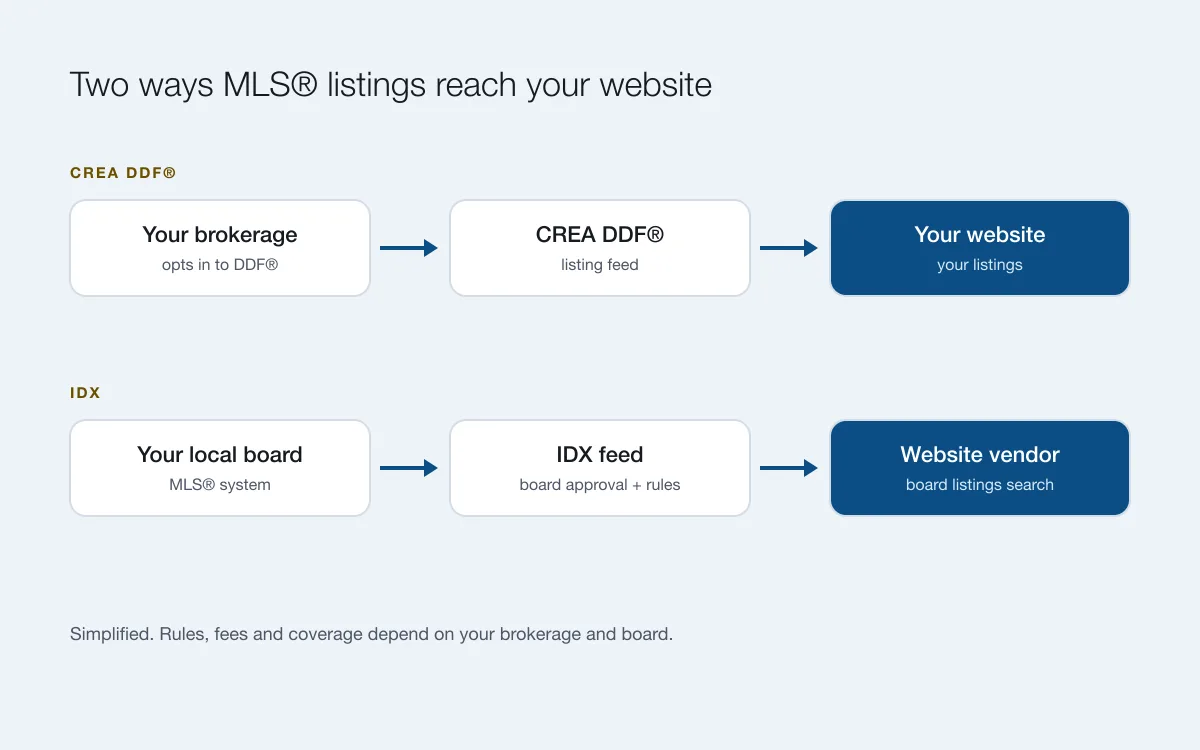
CREA DDF® (Data Distribution Facility) is CREA’s national, permission-based feed of MLS® listings: your brokerage opts in, and you can show your own (or your brokerage’s) MLS® listings on your website. IDX is run by your local board or its MLS® system and usually lets you show other brokerages’ listings in a search, with board approval, rules and sometimes fees. If you mainly want your own listings on your site, DDF® is often enough.
If you’ve asked a website company “can my MLS® listings show on my site?”, you’ve probably heard two acronyms back: DDF® and IDX. They sound interchangeable. They aren’t. They come from different organizations, need different permissions, and put different listings on your website. Knowing the difference saves you from paying for a feed you don’t need — or signing up for a website that can’t show what you expected.
What CREA DDF® is
DDF® stands for Data Distribution Facility. It’s run nationally by The Canadian Real Estate Association (CREA). In CREA’s words, it was created so members can “easily disseminate MLS® listing content to multiple websites” while keeping that content accurate and up to date (CREA DDF® Policy and Rules).
DDF® is permission-based and has several channels. The ones that matter for your own website are:
- Member Website Feed — a feed of your own listings, or of all your brokerage’s listings, to show on your own website.
- National Shared Pool — participants contribute their listings to a national pool and can show other participants’ listings on their websites.
Other channels send listings to franchisor websites, real estate advertising websites and CREA partners. Under the policy, brokerages choose whether to participate, and a brokerage that has opted in can set permissions for its salespeople. If your brokerage hasn’t opted in, a DDF®-based website can’t show your MLS® listings — the first question to ask your managing broker.
What IDX is
IDX (Internet Data Exchange) is a programme run at the board level — by your local real estate board or association, or the MLS® system it uses. It lets participating members show listings from other brokerages on their own websites, usually as a property search. Each board sets its own rules: who can apply, which website vendors are approved, what must be displayed with each listing, how often data must refresh, and what it costs. Some boards also offer a VOW (Virtual Office Website), a sign-in area that can show more data, such as sold information where the board allows it.
Because IDX is local, coverage varies by vendor and by board. Website companies publish the boards they support, and some charge a per-board data fee on top of the website.
DDF® vs IDX side by side
| CREA DDF® | IDX | |
|---|---|---|
| Run by | CREA, nationally | Your local board or its MLS® system |
| Who opts in | Your brokerage (and gives you permission) | You and your brokerage apply to the board, often through an approved vendor |
| Typical use on your site | Your own (or your brokerage’s) listings; shared-pool listings where available | A search of listings from many brokerages on your board |
| Rules | CREA’s DDF® Policy and Rules, adopted by boards | Each board’s IDX rules and display requirements |
| Cost | Set by your website provider; no separate board fee with some providers | Varies; some vendors pass on a board data fee |
Which one do you need?
“I want my own listings on my website.”
DDF® is usually enough. Your listings arrive with their photos and stay in step with MLS®, so you never retype a listing. This is what most individual agents actually want: a site that shows their work.
“I want buyers to search every listing on my board.”
That’s a board-wide search, typically IDX. Check which boards a vendor supports, whether there’s a data fee, and whether your board requires anything special on the page. Ask whether the search works on phones — most of your visitors will be on one.
“I want sold data and market reports.”
Sold information is tightly controlled. Some boards allow it in a VOW behind a sign-in; many don’t allow it publicly at all. Regulators also caution about publishing sale prices — in Ontario, RECO’s advertising bulletin says advertising must not reveal the contents of an agreement, such as the price, without the parties’ consent.
How to get a CREA DDF® feed on your website
For your own listings, the steps are much the same whichever provider you use:
- Ask your managing broker whether your brokerage participates in DDF®. It’s the brokerage’s choice, and nothing works without it.
- Get your permission. A brokerage that has opted in can let its salespeople use the feed for their own websites.
- Find your CREA agent ID. It’s the number on your REALTOR.ca profile. Website providers use it to match the feed to your listings.
- Choose how the feed reaches your site: a website with DDF® built in, or a plugin you add to a site you already run (see below).
- Check the result. Your active listings should appear with their photos, and change on your site when they change on MLS®.
DDF® plugin or a website with DDF® built in?
If you already run a WordPress or other self-built website, a DDF® plugin or integration can pull the feed into it. That keeps your current site, but you (or your developer) look after the setup: connecting the feed, hosting the photos, keeping the plugin updated, and adding the display rules your board and CREA require.
A website with DDF® built in does that work for you. You enter your agent ID, and the provider handles the feed, the photos and the listing pages. You give up some control over the code, and get a site that keeps working without upkeep. For the plugin options and what they cost, see CREA DDF® plugins for WordPress.
| DDF® plugin on your own site | DDF® built into the website | |
|---|---|---|
| Setup | Install, connect the feed, style the pages | Enter your CREA agent ID |
| Upkeep | Plugin and site updates, hosting, photo storage | Done by the provider |
| Control | Full control of your site’s code | Within the provider’s templates and settings |
| Best for | Agents with a developer or an existing custom site | Agents who want listings working without technical work |
How RealtyTerminus handles MLS® listings
On the MLS plan (CA$126/yr), RealtyTerminus uses CREA DDF®. You enter your CREA agent ID in your admin; once it’s verified, your own MLS® listings and photos appear on your website and stay up to date. Your website also gets a Map search page where visitors search MLS® listings by location, type, price, beds and baths.
- Where it works: for REALTORS® whose brokerage participates in DDF®, in every province except Quebec and Manitoba.
- When a listing sells: it isn’t deleted. Click Mark as sold and it stays on your site with a Sold label, as proof of your track record. The sale price is never shown.
- Limits: MLS® listings never count toward your plan’s listing limit.
- Not on DDF®? Add listings yourself on any plan, including exclusives and past sales.
We don’t offer board-specific IDX or VOW programmes. If your business depends on board-wide sold data or IDX-only boards, a platform that specializes in IDX may suit you better.
Questions to ask any website provider
- Do you use DDF®, IDX or both — and for my board specifically?
- Will it show only my listings, my brokerage’s, or everyone’s?
- Is there a data fee on top of the website price?
- What happens to my listing page when the property sells?
- Who adds the board’s required disclaimer and logo?
Ready to set it up? Follow how to show your MLS® listings on your own website, or read how MLS® listings work on RealtyTerminus.
Questions
What does DDF® stand for?
Data Distribution Facility. It’s run by The Canadian Real Estate Association (CREA), which is why it’s usually called CREA DDF®.
What is a DDF® feed?
A steady stream of MLS® listing data (photos, price, description, status) sent from CREA to an approved website. When a listing changes or comes off the market, the feed updates the website, so you don’t edit listings by hand.
Which websites can use CREA DDF®?
Websites run by REALTORS® and brokerages that take part in DDF®, through a website provider or plugin that receives the feed. RealtyTerminus has DDF® built in on the MLS plan: you enter your CREA agent ID and your listings appear.
Is DDF® the same as IDX?
No. DDF® is CREA’s national data distribution facility with several channels, including a Member Website Feed for your own listings. IDX is a local board programme for showing listings from many brokerages in a search on your site.
Who has to opt in to DDF®?
Your brokerage. Under CREA’s DDF® policy, brokerages choose whether to take part and can give their salespeople permission. If your brokerage hasn’t opted in, ask your managing broker.
Does DDF® work in every province?
Coverage depends on your board and brokerage. RealtyTerminus offers MLS® listings via CREA DDF® in every province except Quebec and Manitoba.
Can I show sold listings?
Feeds generally carry active listings. On RealtyTerminus, when your listing leaves MLS® you can mark it as sold so it stays on your site with a Sold label, and the sale price is never shown.
What is a CREA agent ID?
It’s the number on your REALTOR.ca profile. Website providers that use CREA DDF® use it to match the feed to your own listings.
Do I need a DDF® plugin?
Only if you want the feed on a website you already run yourself, such as WordPress. A website with DDF® built in, like RealtyTerminus on the MLS plan, needs no plugin: you enter your CREA agent ID and your listings appear.
Do I need IDX to have a search on my site?
Not always. On the RealtyTerminus MLS plan your website gets a Map search page where visitors search MLS® listings. Check with your board if you need its specific IDX programme.