
CREA DDF® plugin for WordPress: what it takes, and the no-plugin option
A plugin can put MLS® listings on the WordPress site you already have. Here are the two kinds, what each asks of you, and the no-plugin option.
Short answer
There are two kinds of CREA DDF® plugin for WordPress. Import plugins pull listings and photos onto your own server, so your hosting must handle scheduled imports and you keep everything updated. Service plugins connect your site to a vendor’s listing service for a subscription, so your server does little. Either way you need CREA membership and a brokerage that participates in DDF®. A website with DDF® built in needs only your CREA agent ID.
If you already have a WordPress website, a CREA DDF® plugin sounds like the obvious way to add your MLS® listings. It can work well, but “DDF® plugin” covers two quite different things: plugins that import the feed onto your own server, and plugins that connect your site to a vendor’s paid listing service. This guide explains both, what each one asks of you, and how they compare with a website that has DDF® built in.
Two kinds of CREA DDF® plugin
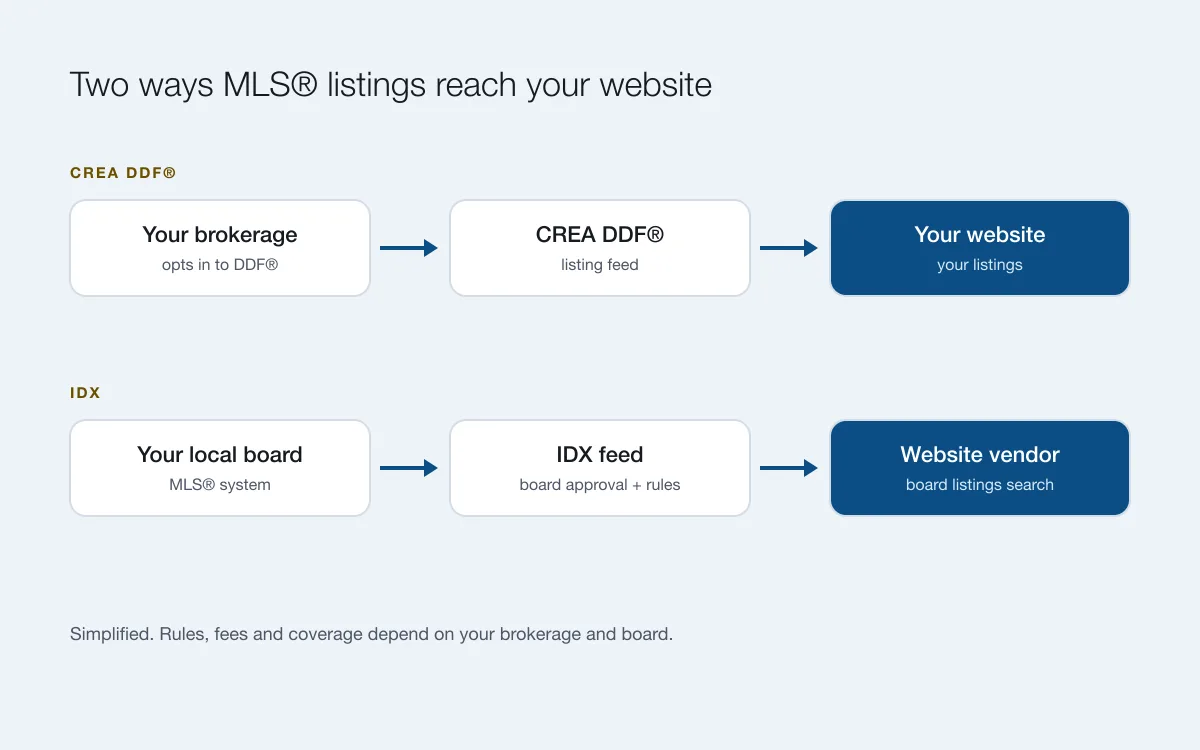
CREA’s Data Distribution Facility (DDF®) sends MLS® listing content to members’ websites (CREA DDF® Policy and Rules). A WordPress plugin can bring that content to your site in one of two ways.
1. Import plugins (self-hosted)
The plugin connects to your feed on a schedule, imports listings and photos into your own WordPress database, and builds listing pages and a search on your site. You usually pay once or yearly for the plugin, and your server does all the work.
2. Service plugins (vendor-hosted)
The plugin is a small connector to a listing service the vendor runs. The vendor handles the feed, the photos and the updates on its own servers, and the plugin shows the listings on your pages, often with a shortcode or widget. You pay a monthly or yearly subscription, and your hosting does very little.
What you need before you install one
- CREA membership and a participating brokerage. Your brokerage chooses whether to take part in DDF® and can give you permission. Without it, no plugin can show your listings.
- A DDF® feed for your website. You set it up through CREA’s member tools and give the plugin its details. Decide whether you want your own listings, your office’s, or shared listings from other participants.
- A WordPress site you can add plugins to. For an import plugin, your hosting must also allow scheduled tasks and long-running imports, and have room for thousands of photos. A service plugin doesn’t need that.
- The plugin or the service. Most maintained options are paid: a one-time or yearly licence for import plugins, a subscription for services. Check what the price covers: updates, support, and how many sites.
The upkeep with an import plugin
- Updates. WordPress, PHP, your theme and the plugin all need updating, and an update in one can break another.
- Imports. If the scheduled import stops (a full disk, a host change, an expired feed), your listings quietly go stale.
- Photos and speed. Listing photos fill disk space and can slow the site; you may need a bigger hosting plan as listings grow.
- Display rules. CREA’s rules and your board’s requirements decide what must appear with listings, such as trademark notices. Your theme has to show them.
- Security and backups. A plugin that writes thousands of records a day is one more thing to keep secure and backed up.
What to check with a service plugin
A service takes the server work off your hands, so the questions are different:
- Where do listing pages live? Pages on your own domain can help you in Google. Listings shown in a frame, or on the vendor’s address, mostly help the vendor’s site instead.
- What does it cost over time? You pay every month for as long as you show listings, on top of your WordPress hosting, theme and plugins.
- What happens if you stop? The listings usually disappear from your site the day the subscription ends.
- Does it match your theme? Widgets and shortcodes can look out of place on a custom design.
- Which feeds does it support? Some services use IDX from certain boards rather than CREA DDF®. Ask which one your listings would come from.
Limits to check before you buy
Plugins differ, so read the vendor’s own requirements page. Questions worth asking:
- How often are listings updated? Daily is common.
- Is there a daily import limit? Some plugins cap imports per day, which makes a whole province impractical.
- Does it work on managed WordPress hosting? Some vendors advise against it.
- How much server memory and CPU does it need for the number of listings you want?
- Is the price one-time, yearly or monthly, and what happens to updates, support and your listings when it ends?
The no-plugin option: DDF® built into the website
A website with DDF® built in does the same job without a plugin, a second subscription or a server to look after. On RealtyTerminus, the MLS plan (CA$126/yr) uses CREA DDF®: you enter your CREA agent ID in your admin and, once it’s verified, your MLS® listings and photos appear on your website and stay up to date. Visitors also get a Map search page to browse your province’s DDF® listings.
| Import plugin | Service plugin | RealtyTerminus MLS plan | |
|---|---|---|---|
| You set up | Hosting, WordPress, the plugin, the feed, page styles | WordPress, the plugin, a service account | Your CREA agent ID |
| Who runs the feed | Your server | The vendor | We do |
| You pay for | Plugin licence + hosting that can handle imports | Subscription + your WordPress hosting | One plan: website, hosting and listings (CA$126/yr) |
| Updates | You: WordPress, PHP, plugin | You: WordPress and the plugin | Done for you |
| Listing pages on your domain | Yes | Depends on the service | Yes |
| Sold listings | Usually removed when they leave the feed | Depends on the service | Mark as sold keeps them, with a Sold label and no price |
| Control of the design | Full | Your theme, plus the vendor’s widgets | Within our templates and settings |
What it costs over a year
Prices change, so check each vendor’s current page. As a guide, from vendors’ public pages in November 2026:
- Import plugins were listed at roughly $80 to $300 one time, plus hosting strong enough to run imports, often $10 to $30 a month.
- Service plugins ran up to about $50 a month (around $500 a year), plus your WordPress hosting. One low-cost service we found had stopped offering its DDF® feed, so check that a service is still active before you build around it.
- RealtyTerminus MLS plan: CA$126/yr for the website, hosting, SSL and your DDF® listings together.
Add a theme, your own time on updates, and any developer help, and the plugin route usually costs several times more per year than a website with DDF® built in. It can still be worth it if you need full control of a WordPress site.
Which should you choose?
Choose an import plugin if…
you already have a WordPress site you love, someone technical who looks after it, and you want full control over how listings look. Budget for the plugin, suitable hosting and a little time every month.
Choose a service plugin if…
you want to keep your WordPress site but not run imports yourself, and you’re happy to pay a subscription. Check that listing pages sit on your own domain.
Choose a website with DDF® built in if…
you want your website and your listings in one place, for one price, without plugins or updates to manage, or your current WordPress site is due for a refresh anyway. DDF® works for REALTORS® whose brokerage participates, in every province except Quebec and Manitoba.
Still deciding between feeds? Read CREA DDF® vs IDX, or see how MLS® listings work on RealtyTerminus.
Questions
Is there a free CREA DDF® plugin?
Free plugins exist in the WordPress plugin directory, but check when each was last updated and tested with your WordPress version before you rely on it. Most maintained DDF® plugins are paid.
Do I need my brokerage’s permission?
Yes. Under CREA’s DDF® policy, your brokerage chooses whether to participate. If it hasn’t opted in, no plugin or website can show your MLS® listings through DDF®.
Will a DDF® plugin work on managed WordPress hosting?
A service plugin usually will, because the vendor’s servers do the work. An import plugin often won’t work well: imports run on a schedule and can take a long time, and at least one plugin vendor advises against managed WordPress hosting for that reason. Check the requirements first.
Can I show listings from my whole province?
It depends on the feed and the plugin. Some import plugins cap how many listings they import a day, which can make a whole province impractical. On RealtyTerminus, the MLS plan shows your own listings and your province’s DDF® listings with no import limit to manage.
How much does a CREA DDF® plugin cost?
From vendors’ public pages in November 2026: import plugins roughly $80 to $300 one time, plus hosting that can run imports; service plugins up to about $50 a month, plus WordPress hosting. The RealtyTerminus MLS plan includes the website, hosting and DDF® listings for one yearly price.
Does RealtyTerminus have a WordPress plugin?
No. RealtyTerminus is a complete realtor website with DDF® built in. You can connect your own domain to it, so visitors still find you at www.yourname.com.