
New realtor website checklist (BC, Ontario, Alberta): what regulators expect
Your website is advertising. Here’s what BCFSA, RECO and RECA say it has to show — and the rest of the checklist for a site that wins trust.
Short answer
In all three provinces your website counts as advertising: show your full brokerage name clearly on every page, use your name exactly as licensed or registered, back up any claims or awards with the source and date, keep listings current, and get consent before publishing anything that identifies a client or a sale. Check your regulator’s current guidance and your brokerage’s policy before you publish.
Congratulations on your licence. Somewhere on your list is “get a website”, and it’s tempting to pick a template, add a nice photo and go. Before you publish, know this: in British Columbia, Ontario and Alberta, your website is advertising, and the same rules apply to it as to a sign or a newspaper ad. This checklist sums up what each regulator’s published guidance says, then adds the practical items that make a new agent’s site work.
Plain-language summary of public guidance as of October 2026, not legal advice. Guidance changes; read the linked pages and follow your brokerage’s advertising policy and your managing broker’s direction.
The rules all three provinces share
- Your website is advertising. BCFSA, RECO and RECA all treat websites and social media as advertising.
- Show your brokerage clearly. The full brokerage name must be easy to see and read.
- Use your name as licensed or registered. Not a nickname you haven’t had approved.
- Back up every claim. “Top producer”, sales volume or awards need the source, date and what was measured.
- Keep it current and accurate. Expired listings come down; changed details get updated.
- Get consent. Don’t publish anything that identifies a client, a property or the terms of a deal without permission.
British Columbia (BCFSA)
BCFSA’s Advertising Guidelines and Advertising Checklist point to sections 37–42 of the Real Estate Services Rules. For your website:
- Full brokerage name, prominently. The checklist says advertising must include the full brokerage name as registered — a short form isn’t enough — displayed prominently and in an easily readable form, and it names websites and webpages specifically.
- Your licensee name. Your legal name, a recognizable short form of it, or a name BCFSA has approved.
- Personal real estate corporation. If you have a PREC, advertising that identifies you uses the PREC’s licensee name.
- Teams. Team names must be approved by BCFSA, the brokerage name must still be prominent, and unlicensed team members must be identified as unlicensed.
- No translated brokerage names. If you write pages in Punjabi, Chinese or another language, the brokerage name stays as registered.
- Other agents’ listings. Don’t show them without permission, and make it clear which listings are yours.
- Address. If you show an office address, it must be your brokerage’s.
Ontario (RECO)
RECO’s Bulletin 5.1, Advertising requirements defines advertising to include websites and social media. For your website:
- Brokerage clearly and prominently identified, using the name registered with RECO, with the descriptor “brokerage” or “real estate brokerage”.
- Your name exactly as registered. RECO says short forms and nicknames must not be used.
- A permitted term next to your name, such as real estate agent, salesperson or broker. On a multi-page website, if you use a symbol (like an asterisk) instead, the symbol and its meaning must appear on every page that refers to agents.
- No identifying a party, a property or the contents of an agreement (such as the price) without consent.
- Claims, volume and awards must be accurate and verifiable, with the details; a team award should say it’s a team award and how big the team is.
Alberta (RECA)
RECA’s Advertising page and its Advertising Guidelines (PDF) are the most specific about websites:
- Every viewable page of a website you own or control for advertising must clearly disclose your name and your brokerage.
- “Clearly indicated” means a reasonable consumer can distinguish the brokerage name from the ad alone. A logo or the brokerage’s web address doesn’t count.
- Teams and brand names are allowed, but you can’t give the impression that your team is a brokerage.
- Listings online should match the property’s actual status, show when they were last updated, and not include other brokerages’ listings without written permission.
- Don’t copy content. Taking another professional’s blog post and posting it as your own can raise copyright issues.
Your launch checklist
With the rules covered, here’s everything a new agent’s website needs on day one.
Must have
- Brokerage name (full, as licensed) and your licensed name in the footer of every page, plus your licence line if you want it.
- Your own domain, such as yourname.ca, with https.
- A real headshot and a short bio that says where you work and who you help.
- A phone number and a contact form that reaches you — and a habit of replying the same day.
- A privacy policy that explains what you do with enquiries.
- Your board’s required listing disclaimer, if you show MLS® listings.
Should have
- Buying and selling pages written for your area, not generic copy.
- A home valuation form for sellers.
- Two or three blog posts that answer local questions (strata fees, first-time buyer programmes, school catchments).
- Testimonials — with your clients’ permission.
- A Google title and description for your home page, and your site verified in Google Search Console.
Avoid
- “#1 agent” or “top producer” without the basis for the claim.
- Sale prices or client names without consent.
- Other agents’ listings outside an approved feed.
- Leaving last year’s headline up. An out-of-date site quietly says you’re not active.
How RealtyTerminus helps
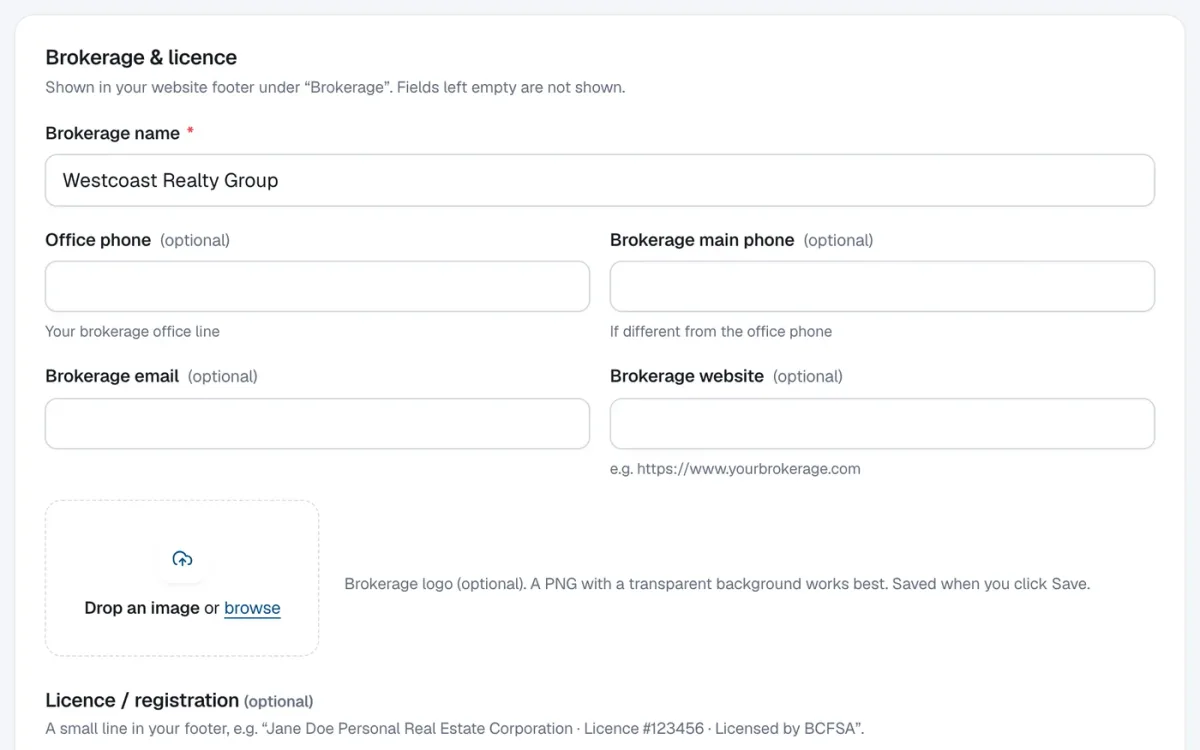
Every RealtyTerminus website has a Brokerage & licence panel (Website → Branding): brokerage name, phones, email, website and logo, plus an optional licence line with your licensed name, licence number and regulator. They’re shown in the footer of every page. Sold listings never show a price. Sign-up asks for your brokerage, and the dashboard’s Next steps checklist walks you through the rest. Start with how to add your brokerage and licence details.
Then read what a realtor website costs in Canada or set up your MLS® listings.
Questions
Do I really need my brokerage name on every page?
In Alberta, RECA’s guidelines say every viewable page of a website you control must clearly disclose your name and brokerage. BCFSA and RECO require the brokerage name to be clearly and prominently shown in all advertising, which includes websites. A footer on every page is the simplest way to do it.
Can I use a nickname on my website?
In Ontario, RECO says the name must match the one registered with RECO, with no short forms or nicknames. In BC you can use your legal name, a recognizable short form of it, or a name BCFSA has approved. In Alberta, use the name on your licence.
Can I say I’m a “top producer”?
Only with the basis for the claim. All three regulators expect comparative claims, volume and awards to include the source, date and what was measured.
Can I post a sold price?
Be careful. RECO says advertising must not reveal the contents of an agreement, such as price, unless all parties consent. RealtyTerminus never shows a price on sold listings.
Is this legal advice?
No. It’s a plain-language summary of public regulator guidance as of October 2026. Your managing broker and your regulator have the final word.