
Can I add a listing to my real estate website without filling in a long form?
How describing a listing works, getting your REALTOR.ca or Zillow listing onto your own website, and what we never do.
Short answer
Yes. On RealtyTerminus you click New listing and type the details the way you’d say them, for example “3 bed townhouse, 6-1133 Eagle Pass Way, Sicamous BC, $749,900, 2.5 baths, 1650 sq ft”, and the listing is filled in for you in a few seconds. If it’s already on REALTOR.ca, Zillow, Realtor.com or your brokerage’s website, you can paste the text of your own listing page instead. You check what was filled in, add your own photos and click Save; it’s included on every plan, including the free trial.
At a glance
- Where: in the admin, Listings → New listing opens on “Tell us about the listing”. Type the details, or paste your own listing page, and click Create my listing.
- What it fills in: headline, address, price, property type, bedrooms, bathrooms, size, lot size, year built, MLS® number, description, features and open houses, when they are in what you typed or pasted.
- Nothing is made up: a detail that isn’t in what you gave stays blank. Each filled field is marked so you can check it.
- Photos: you add your own. Photos are never copied from other websites.
- Privacy and rules: we only read the text you type or paste. We never visit or copy the page ourselves. Paste only your own listings (or your brokerage’s).
- Nothing goes live until you click Save.
- Plans: every plan, including the 30-day free trial. Each month you can create as many listings this way as your plan has active listings.
- Canada and the US: works for both, including state, ZIP code, square feet and US dollars.
- Your own MLS® listings can also arrive automatically through CREA DDF® on the MLS plan (Canada). Prices: https://www.realtyterminus.com/pricing
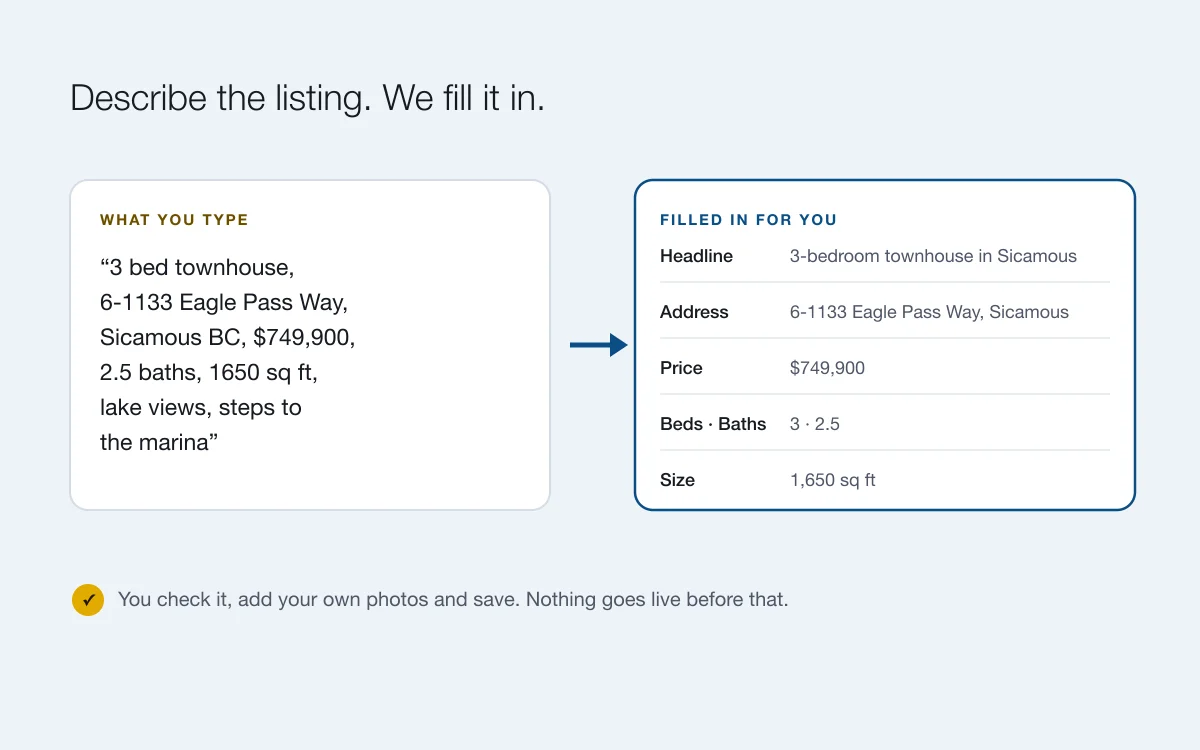
Describe it in your own words
- Click New listing. In your admin, go to Listings and click New listing. It opens on “Tell us about the listing”.
- Type the details. An address, a price, the bedrooms and bathrooms and what stands out, the way you’d tell a client. Short notes are fine.
- Click Create my listing. In a few seconds the listing is filled in. Every filled field is marked “Filled in for you” so you can check it.
- Add photos and save. Add your own photos, change anything you like, then click Looks good — save it.
Step by step with pictures: How to fill in a listing by describing it.
Already listed on REALTOR.ca or Zillow?
Open your own listing on REALTOR.ca, Zillow, Realtor.com or your brokerage’s website, select the whole page (Ctrl+A, or Cmd+A on a Mac), copy it and paste it on New listing. We pick out the price, address, rooms, size, MLS® number, description, features and open houses, and leave out the menus, ads and similar homes. Tick that it’s your own listing (or your brokerage’s) and click Create my listing.
What we never do
- Visit the page. We only read the text you type or paste.
- Copy photos. You add your own before you save.
- Make things up. A detail that isn’t in what you gave stays blank for you to fill in.
- Publish without you. Nothing appears on your website until you click Save.
Who it helps most
Agents whose listings aren’t in our MLS® feed (their brokerage doesn’t share through CREA DDF®, or the listing is brand new), agents in the US, exclusives and coming-soon homes, and property managers adding rentals. On the MLS plan in Canada, your own MLS® listings can also arrive automatically: see MLS® listings. More about this feature: Describe a listing.
Questions
How do I get my REALTOR.ca or Zillow listing onto my own website?
Open your listing, select the whole page (Ctrl+A, or Cmd+A on a Mac), copy it and paste it on New listing. We fill in the price, address, rooms, size, description and more; you add your photos and save. On the MLS plan in Canada, your own MLS® listings can also arrive automatically through CREA DDF®.
Is it free?
It’s included on every plan, including the free trial. There’s nothing extra to buy.
How many listings can I create this way?
Each month, as many as your plan has active listings. You can always fill in the form yourself too.
Do I need the MLS plan?
No. It’s made for listings that aren’t in our MLS® feed: exclusives, listings from a brokerage that doesn’t share through CREA DDF®, rentals and listings in the US.
Does it copy my photos?
No. You add your own photos before you save. We never copy photos from other websites.
Is my listing published straight away?
No. You check what was filled in and click Save; only then does it appear on your website.