
How to connect your own domain
On a paid plan, go to Website, then Domain, type your domain (e.g. www.yourname.com) and click Connect, add the CNAME record shown at your registrar, then click Re-check DNS; SSL is set up for you.
Every website has a free address like yourname.realtyterminus.net. On a paid plan you can use a domain you own instead, bought from any registrar (GoDaddy, Namecheap, Squarespace, Cloudflare…). Only your website moves: your email stays with your current provider.
Steps
Open Domain
Open Website in the menu and click Domain.
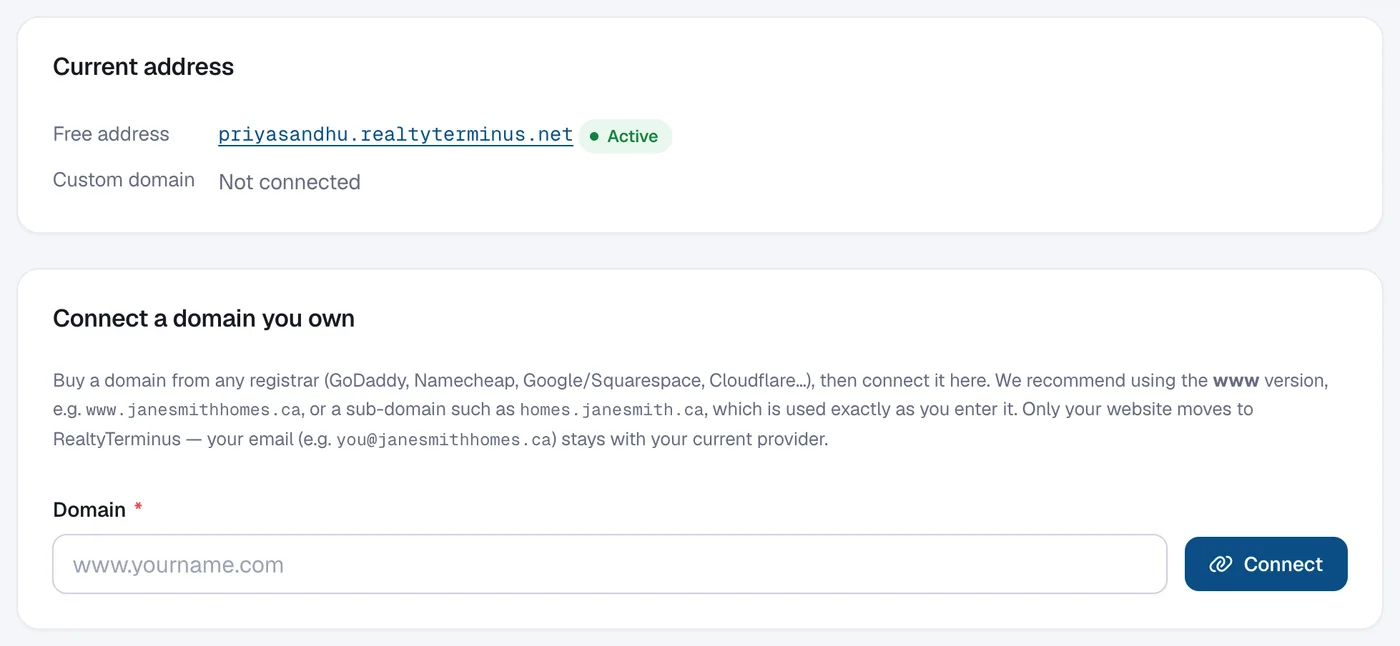
Enter your domain
Under Connect a domain you own type your domain into Domain. We recommend the www version, e.g.
www.janesmithhomes.ca, or a sub-domain such ashomes.janesmith.ca. Click Connect.Add the DNS record
DNS setup shows the exact record to add, with Copy buttons and step-by-step instructions. Sign in where you manage your domain’s DNS and add it. See Which DNS records do I add for my domain?

Forward the root domain
If you connected a www address, also forward the root domain (e.g.
janesmithhomes.ca) tohttps://www.janesmithhomes.caat your registrar: look for “Forwarding” or “URL redirect” and choose Permanent (301).Click Re-check DNS
Come back and click Re-check DNS. When the record is found, your website goes live on your domain and the SSL certificate (https) is issued automatically. We keep checking for you too.
Questions
How long does it take?
DNS changes usually take a few minutes, but can take up to 24 hours.
Will my email stop working?
No. Don’t change your MX (email) records; your email stays with your current provider.
Can I connect a domain on the Free plan?
No. The Free plan runs on your free address only. Choose Basic, MLS or Builder to connect a domain.
I didn’t finish within 14 days. What now?
Add the record, then click Connect again to get another 14 days.